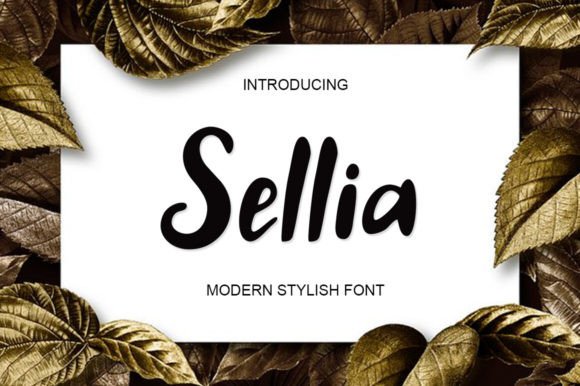
Sellia: A Fresh Handwritten Font
Sellia is a fun and fresh handwritten font that brings personality to digital design. As a web designer, I appreciate how it adds warmth and character to layouts without sacrificing clarity. Whether you're working on a website, app screen, or online store, Sellia can enhance your visual storytelling and brand expression.
Its unique script style gives a handcrafted feel that feels approachable and modern. The fluid strokes and subtle variations in weight make it ideal for headings, logos, and decorative elements. Sellia’s versatility makes it a valuable addition to any design toolkit, especially when paired with clean, readable typefaces for body text.
Using Sellia in Web Design
Sellia excels in digital environments where visual hierarchy and brand tone matter. It works well in hero sections, call-to-action buttons, and section headers. Its organic shape helps guide the eye and create a natural flow through content. For example, using Sellia in a creative portfolio site can instantly convey a sense of artistry and individuality.
In landing pages, Sellia can be used to highlight key value propositions or unique selling points. When paired with a simple sans serif font like Roboto or Open Sans, it creates a balanced contrast that improves readability. This pairing also supports a professional yet friendly brand tone, making it suitable for SaaS startups, coaching websites, and online courses.
For online stores, Sellia can elevate banners, product titles, and promotional graphics. Its playful nature pairs well with bold colors and dynamic layouts. However, it's important to use it strategically—overusing it can reduce legibility, especially on small screens or dark backgrounds.
Readability and Responsive Design
Sellia performs best in larger sizes where its details can shine. On mobile screens, it’s ideal for headlines and short phrases rather than long paragraphs. When used in buttons or CTA elements, ensure there's enough spacing and contrast to maintain readability.
On dark backgrounds, Sellia retains good visibility but may require slight adjustments in line height or letter spacing for optimal clarity. When overlaid on images, it works best with light text and minimal shadows to avoid blending into the background.
For responsive layouts, test Sellia at different breakpoints to ensure it scales well across devices. Avoid using it in body copy, as its intricate strokes may become difficult to read at smaller sizes.
Brand Identity and Visual Hierarchy
Sellia contributes to a strong brand identity by adding a personal touch to digital experiences. It’s particularly effective for brands that want to communicate creativity, authenticity, or a human-centered approach. Whether it's a boutique online store or a lifestyle blog, Sellia can help differentiate a brand from competitors.
In terms of visual hierarchy, Sellia should be reserved for high-impact areas such as headers, logos, and key messages. Using it for body text or low-priority information can confuse users and disrupt the reading flow. Instead, use it as an accent to draw attention to important elements on the page.
When designing for conversion-focused layouts, consider how Sellia influences user behavior. Its friendly appearance can build trust and encourage engagement, but it should never compromise the clarity of the message. A well-placed Sellia heading can reinforce a brand’s voice while maintaining a clean, professional look.
Font Pairing and Design Assets
Pairing Sellia with other fonts enhances its effectiveness. A common approach is to pair it with a simple sans serif for body text, creating a clear contrast between decorative and functional typography. For editorial designs, combining it with a serif font like Georgia or Lora can add sophistication and depth.
When selecting design assets, check the available styles and file formats. Sellia likely includes multiple weights and alternates, which can be useful for customizing the look and feel of your projects. Ensure that the font is available as a webfont so it can be easily integrated into your site without compromising performance.
Also, consider multilingual support if your audience speaks multiple languages. Some fonts may not include all characters, so verify that Sellia supports the languages you need before using it in global campaigns.
Commercial Licensing and Usage
When using Sellia in commercial projects, always check the licensing terms. Most premium fonts allow usage on websites, client projects, and online stores, but restrictions may apply depending on the license type. Make sure you have the proper rights to use the font across all platforms, including social media graphics and email templates.
For digital product creators, Sellia can be a powerful tool in branding and marketing materials. Whether it's a course sales page, blog header, or branded web content, it adds a distinct personality that aligns with your creative vision.
As a web designer, I recommend experimenting with Sellia in different contexts to find the right balance between aesthetics and functionality. Its ability to blend creativity with clarity makes it a standout choice for modern digital design.